How to Reply to Google Reviews: Guide + Templates
Whether it's 5 stars or 1 star: every reply is public and shapes how future customers see you. Here you'll find the step-by-step guide, 12 copy-ready templates and the way to speed up replies with AI.
- 1 free credit to start
- No subscription required
- Purchased credits never expire
Reading time for the whole guide, with a quick answer for those in a hurry right in the first chapter.
General information. No legal advice and no assessment of individual reviews.
- 7 chapters
- 6 questions and answers
- As of: July 2026
- Google decides
01Quick answer
How do you reply to Google reviews?
You reply to Google reviews via your Google Business Profile: sign in via Google Search or Google Maps, open the "Reviews" section, select the review and click "Reply". The reply appears publicly beneath the review and can be edited or deleted at any time. Only whoever manages the verified business profile can reply.
Important to know: a reply doesn't just reach the reviewer – it reaches everyone who visits your profile. You are always writing for two audiences: the review's author and every future customer reading along.
On this page you'll find the guide for the Google Business Profile, six ground rules for professional replies and copy-ready templates for positive, negative and comment-free reviews.
02Process
Step by step: replying via the Google Business Profile
You need access to your company's verified Google Business Profile. A reply then takes less than a minute:
- 1
Open your Google Business Profile
Sign in with the Google account that manages your business profile. Search for your company name in Google Search or open your profile in Google Maps.
- 2
Go to reviews
Click "Reviews" in the profile menu. You'll see all reviews in chronological order and can filter for unanswered ones.
- 3
Write your reply
Select the review and click "Reply". Use one of the templates on this page as a starting point and adapt it to the specific case – name, a detail from the review, your tone.
- 4
Check and publish
Read the reply through once, double-check names and facts, and click "Post reply". The reply is publicly visible immediately and can be edited later at any time.
03Ground rules
6 ground rules for professional replies
These rules apply to every reply – regardless of whether the review is positive or negative.
Reply within 24–48 hours
Fast replies show Google and your customers that the profile is actively maintained. For negative reviews: categorise first, then reply – but don't wait longer than two working days.
Personal instead of boilerplate
Address the reviewer by name and pick up one detail from their review. A recognisably copied standard reply often looks worse than no reply at all.
Never disclose customer data
Never confirm order details, diagnoses or contract data in your reply – even if the customer mentions details themselves. Your reply is public and subject to the GDPR.
For praise: thank and be specific
Say thanks briefly, repeat the praised detail and invite them back. That strengthens customer loyalty and your profile at the same time.
For criticism: stay factual, offer a solution
Don't justify, don't attack. Express regret, review internally, offer a direct contact channel. You write the reply for the readers – not to win the argument.
Report non-compliant reviews instead of replying
Fake reviews, insults or reviews without any customer contact shouldn't be answered on substance – you can report them to Google. Google checks every report and decides independently.
04Templates
12 copy-ready reply templates
All templates are deliberately neutral. Replace the placeholders in square brackets, pick up a detail from the review and adapt the tone to your brand.
Replies to positive reviews (4–5 stars)
Short, warm, specific. Repeat the praised detail – that keeps the reply personal and strengthens your profile.
- 5 stars with detailed praise
Thank you so much for your detailed review, [name]! The fact that you highlight [praised detail] delights the whole team – that's exactly what we care about. We look forward to your next visit!
- 5 stars without text
Thank you for the 5 stars, [name]! If you like, tell us next time what you particularly enjoyed. See you soon!
- 4 stars with a minor point of criticism
Thanks for your honest review, [name]! We're glad about the praise for [detail] – and we're taking the point about [criticism] to the team. Exactly this kind of feedback helps us improve.
- Review from a regular customer
Many thanks, [name] – reviews from long-standing customers mean a lot to us. It's great that you've stayed loyal to us since [period]!
Replies to negative reviews (1–3 stars)
Factual, solution-oriented, without blame. The goal is not to win the argument – but to show readers how you handle criticism.
- Justified criticism (e.g. waiting time)
Thank you for your open feedback, [name]. You're right – on [day] the waiting time was significantly longer than it should be, and we're sorry about that. We've adjusted our processes. We'd love to show you it can be better: please get in touch at [contact].
- Criticism you can't match to a transaction
Thanks for your feedback, [name]. We take your account seriously but haven't been able to match it to a transaction so far. Please contact us directly at [contact] so we can look into the case and find a solution.
- Misunderstanding or wrong expectation
Thank you for your feedback, [name]. We're sorry your expectation regarding [topic] wasn't met. [Brief factual clarification, e.g. about services or prices.] If you have any questions, we're happy to help at [contact].
- Emotional but substantive 1-star review
Dear [name], we take your disappointment seriously – a visit to us shouldn't go like this. We'd like to look into the incident internally: please contact us at [contact]. Thank you for taking the time to share your feedback.
- Complaint already resolved
Thanks for your review, [name] – and for the good conversation on [day]. We're glad we found a solution together. If anything is still open, you can reach us at [contact] any time.
Replies to reviews without a comment
Star ratings without text are permitted under Google's policies and usually stay online. A short, composed reply shows readers that you handle them professionally.
- 1 star without text, customer unknown
Thank you for your feedback. Unfortunately we can't match your rating to any transaction and would like to understand what we can do better. Please get in touch at [contact] – we'll take care of it.
- 1 star without text, customer known
Dear [name], we're sorry your impression was negative. We'd like to know what exactly didn't work for you. Feel free to call us at [contact] – we'll find a solution.
- 3 stars without text
Thanks for your rating! For us, three stars mean: good, but room for improvement. What could we have done better? We'd appreciate a short message to [contact].
05AI replies
Replying to Google reviews with AI
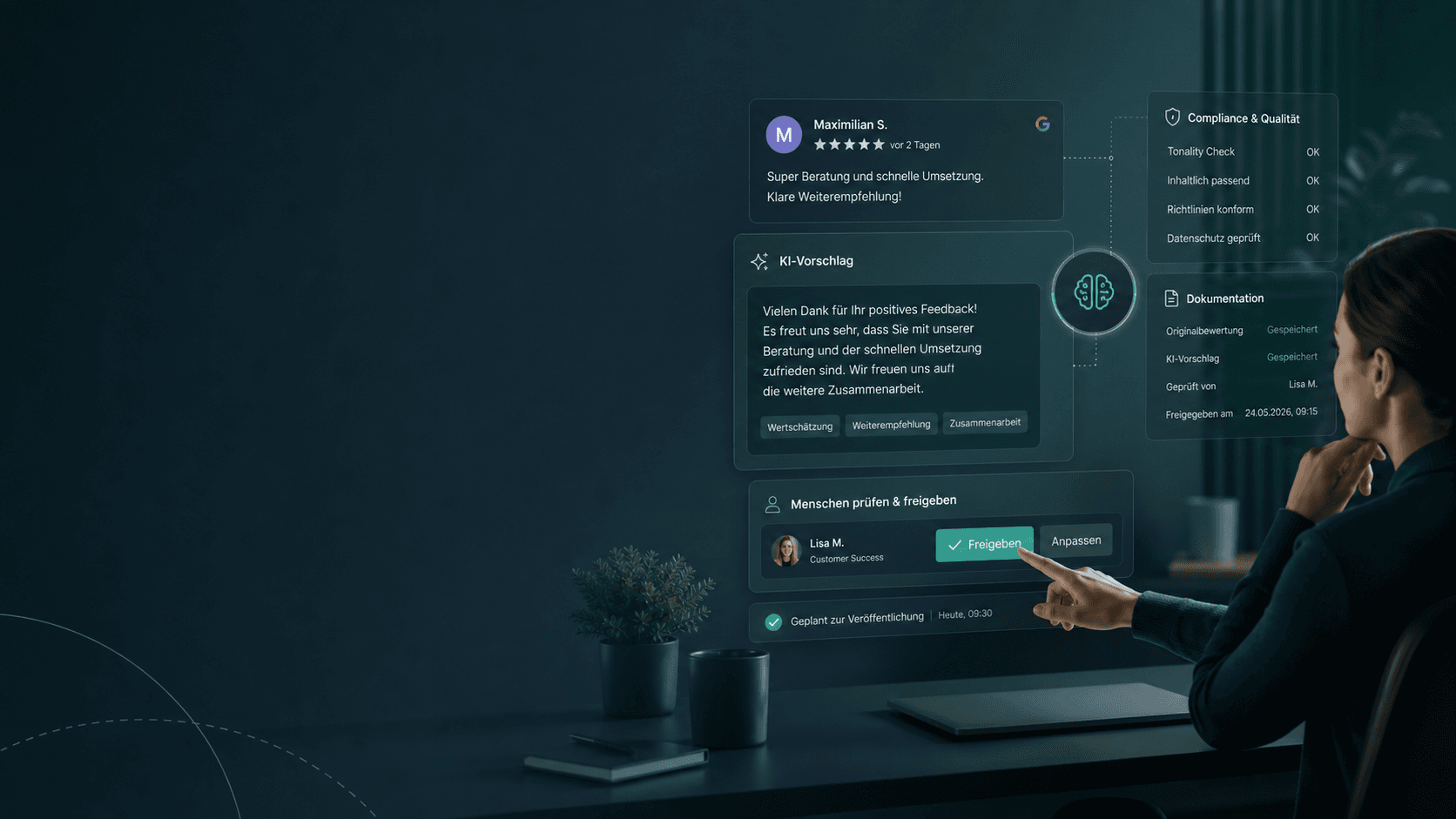
If you receive a lot of reviews, you know the dilemma: every reply should sound personal – but the day only has 24 hours. AI-powered replies solve exactly that: the AI reads the review, captures tone and content and drafts a reply in your brand voice within seconds.
With Sternehero's AI Reply you answer Google reviews AI-assisted directly from the platform – prepared automatically if you wish, and only published after your approval. Every reply stays under your control.
- Reply drafts in seconds instead of minutes – including older, unanswered reviews
- Your tone, your language: the AI adapts to your brand voice
- Manual approval: no reply goes live without your okay
- For single replies without signing up: the free reply generator
06Next steps
Not every review deserves a reply
Fake reviews, insults, reviews without any real customer contact: such reviews violate Google's policies – and should be reported rather than answered. With Sternehero you submit the report self-service; Google checks and decides.
Start free
Start free with 1 free credit
You create an account, connect your Google Business Profile and submit your first report, entirely without payment details. You only buy credits once you actually need them.
- No subscription required
- Free credit valid for 30 days
- Purchased credits never expire
07FAQ
Frequently asked questions about replying to Google reviews
Question not listed? Write to us or read the general FAQ.
No. Only whoever manages the verified Google Business Profile of the reviewed company can reply publicly – the owner or registered administrators. Private users cannot reply to other people's reviews.
Yes. Your reply can be edited or completely deleted in the Google Business Profile at any time. The review itself remains unaffected.
Yes, Google usually notifies the author about your reply by email. In addition, the reply is publicly visible to everyone visiting your profile.
Yes. Replies to positive reviews take little time, strengthen customer loyalty and show an actively maintained profile. You don't have to react to every 5-star rating – but you should to detailed reviews.
Google explicitly recommends that businesses reply to reviews and treats interaction as a sign of an actively maintained profile. Regular replies are part of the basics of local SEO care – but they are not a ranking guarantee.
Don't reply on substance – report the review to Google instead, directly in the profile or efficiently via a self-service tool like Sternehero. Google checks every report and decides independently about removal.
No matching question found. Ask us directly.


Ready in a few minutes
Never leave reviews unanswered again
With Sternehero you answer Google reviews AI-assisted in your brand voice – and report non-compliant reviews in the same workflow.
- 01Create an account
- 02Connect your Google profile
- 03Submit your first report, in a few minutes
Sternehero does not provide legal advice. The decision whether a review is removed rests solely with the respective platform.