Got a negative Google review? Here is how to respond the right way.
Not every negative review is a case for reporting. Depending on the review, you reply professionally, report a policy-violating review to Google, or prevent damage with genuine reviews. This guide shows which route fits when.
- 1 free credit to start
- No subscription required
- Purchased credits never expire
Reading time for the whole guide, with a quick answer for those in a hurry right in the first chapter.
General information. No legal advice and no assessment of individual reviews.
- 8 chapters
- 8 questions and answers
- Google decides
01Quick answer
What should you do about a negative Google review?
First check whether it is honest criticism or a policy violation. Honest criticism is best answered with a factual, professional reply. Policy-violating reviews – for example without real customer contact – you can report to Google; Google reviews every report and decides on removal independently. You cannot delete someone else's review yourself.
Three routes for a negative review: reply professionally, report a policy-violating review, or prevent damage with genuine reviews.
For a complete overview of when Google removes reviews and how reporting works step by step, see the full guide to reporting Google reviews.
02Basics
First assess: honest criticism or policy violation?
Your response depends on the type of review you're dealing with. This classification helps:
Honest criticism
A real customer describes an actual experience – even if it's negative. Such reviews stay online and are not a reason to report.
Possible policy violation
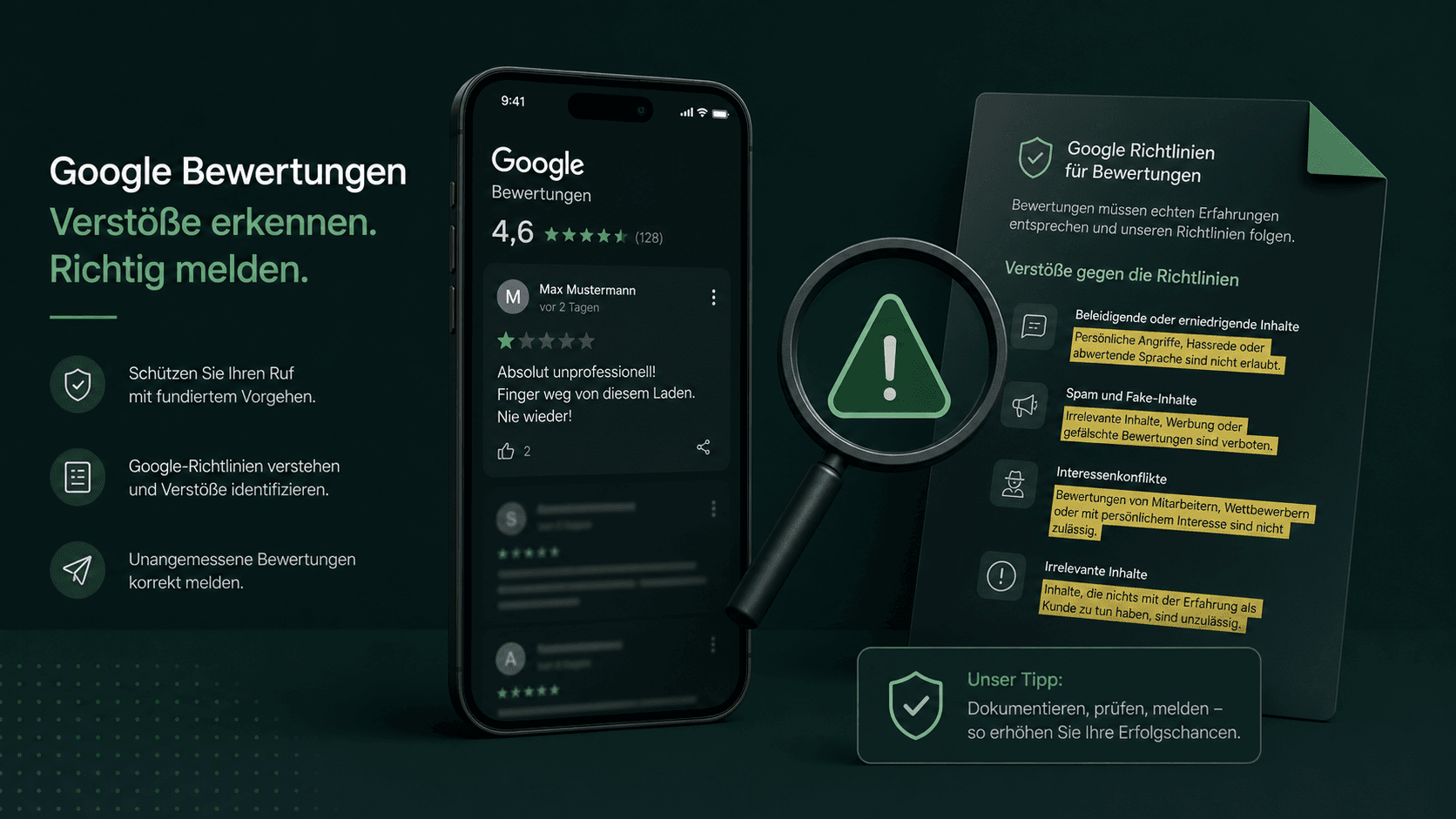
No customer contact, fake, insult, spam or conflict of interest: such reviews violate Google's policies.
ROUTE 1
Reply professionally to honest criticism
Honest criticism from real customers is not a reason to report. A factual, friendly reply shows everyone reading that you take feedback seriously – that often has more impact than the criticism itself.
- Reply promptly and personally – with the name and a reference to the described case.
- Stay factual, don't justify yourself, offer a solution or a way to get in touch.
- Don't reveal customer data – your reply is public and subject to the GDPR.
ROUTE 2
Report a policy-violating review to Google
If the review violates Google's policies, you can report it. Typical reasons include:
No customer contact
The person was never your customer – there was no business contact.
Fake and paid reviews
The review was fabricated or created in exchange for payment.
Spam and duplicates
The same review was published multiple times or automatically.
Insults and defamatory criticism
The review contains abuse instead of factual criticism.
Conflict of interest
The review comes from competitors or former employees.
Off-topic
The review refers to a different business or experience.
Important: Honest criticism from real customers is not a reason to report. The best response is a professional reply – for example with our free reply generator.
04Process
How to report a negative Google review with Sternehero
- 1
Connect your profile
You connect your Google Business Profile and see all reviews in your dashboard.
- 2
Select reviews
You select the reviews where there was no customer contact.
- 3
Confirm and submit
You confirm the missing customer contact, and the software automatically submits your report to Google.
- 4
Google decides
Google reviews your report and decides. You track the status in real time.
05Speed
>80%
Over the last 12 months, Google removed more than 80% of the reports submitted via Sternehero within 15 minutes.
In individual cases the review takes a few days. The decision rests solely with Google.
06Comparison
Paid service provider or self-service tool?
Review service providers usually handle the report for a fee. Sternehero automates the reporting process as a self-service tool at fixed prices per credit. In both cases Google decides whether the review is removed.
| Criterion | Other providerstypical market offers | With SterneheroSelf-service tool |
|---|---|---|
| Commissioning | Request by email or phone, often with follow-up questions | Reported yourself in a few clicks |
| Pricing structure | Pricing model and amount vary by provider, often only on request | Fixed price per credit, visible upfront: from €7 per submission* |
| Status of your reports | You often wait for a response | Status of every report in the dashboard |
| Control | You often hand over the process | You select every report yourself |
| Who decides? | Google.No provider changes that. | |
* in the 250 package, net plus 19% VAT. The comparison refers to typical market offers from review service providers; individual providers may differ. You can still report reviews directly to Google yourself. The decision on every report rests solely with the respective platform.
ROUTE 3
Prevent: counterbalance with genuine reviews
A single negative review carries less weight when many genuine, positive reviews sit next to it. Actively ask satisfied customers for a review – that lifts your average sustainably and works better than any single report.
07Start free
Start free with 1 free credit
You create an account, connect your Google Business Profile and submit your first report, entirely without payment details. You only buy credits once you actually need them.
- No subscription required
- Free credit valid for 30 days
- Purchased credits never expire
08FAQ
Frequently asked questions about negative Google reviews
Question not listed? Write to us or read the general FAQ.
No. Reviews by others can only be deleted by their author or removed by Google. However, you can report a review that violates the policies – Google reviews the report and decides about removal.
Google processes many reports automatically and often decides within minutes; in some cases the review takes a few days. The outcome is determined by Google. You track the status of your reports in the Sternehero dashboard in real time.
No. The decision on every report lies solely with Google. Sternehero automates the submission process – the outcome is determined by the platform.
You pay per submission with credits: 1 credit = 1 report. Credit packages start at €7 per credit (net plus VAT), and credits never expire. You pay for the submission, not the outcome.
No. Sternehero is a software platform. There is no legal assessment of individual reviews and no legal advice. You make all content decisions yourself. For legal questions, we recommend consulting a specialized lawyer.
Honest criticism from real customers is not a reason to report. The best response is a factual, professional reply – it shows other readers that you take feedback seriously.
It depends on the review. Answer honest criticism factually – a good reply often has more impact than the criticism itself. Policy-violating reviews without customer contact you don't answer on the merits; you report them to Google. Google reviews every report and decides independently.
Actively ask satisfied customers for a review. Many genuine, positive reviews lift your average sustainably – a single negative review then matters less than it would with only a few reviews overall.
No matching question found. Ask us directly.
Guides
Related guides
 Google Review Policy Violation: The 9 Reasons and 3 Checks Before Every ReportRead the guide
  Received a Bad Google Review? The 24-Hour PlanRead the guide
  Defamatory Criticism & Inadmissible Google Reviews: What You Can ReportRead the guide
Related pages
This topic in context: the sister pages of this guide.
Ready in a few minutes
Get started now: select a review, report it, track the status.
- 01Create an account
- 02Connect your Google profile
- 03Submit your first report, in a few minutes
Sternehero does not provide legal advice. The decision whether a review is removed rests solely with the respective platform.